If you have a website that has forms on web pages that are HTTP (not HTTPS), it’s possible you’ve received an email from Google Search Console warning you that starting in October 2017, these pages will be marked with a ‘Not Secure’ warning in Chrome. (A copy of one of those email notifications is below).
If you haven’t received an email, but manage websites that are HTTP and have pages with forms capturing some sort of customer data (eg. contact us form) you STILL need to pay attention and update your sites to HTTPS before October 2017.
Below: Search Console security warning for HTTP vs HTTPS
This matters to you! Almost every website (probably including yours) has some kind of form on it. This WILL reduce your conversion rate (the rate at which your prospects fill out forms on your site) significantly. More importantly, a secure internet is better for everyone in the long run.
Why the sudden change?
Actually, this isn’t a new announcement. Google’s plan to label HTTP sites as non-secure has been gradually taking place since January 2017, with the change of Chrome 56.
In recent statements, Chrome has announced this initiative due to cracking down on HTTP infractions with credit cards and passwords.
“Passwords and credit cards are not the only types of data that should be private. Any type of data that users type into websites should not be accessible to others on the network, so starting in version 62 Chrome will show the “Not secure” warning when users type data into HTTP sites.” – Chromium Blog
And while Chrome is leading this change, you can expect other browsers to follow suit.
What does this mean?
For starters, you’ll want to know the difference between HTTP and HTTPS.
With HTTP, you sit at your browser and interact with data. HTTP’s job is to present that data to you, and browsers are the means of doing so. Mozilla’s Firefox browser, for example, understands HTTP instructions and arranges the data as the site’s designer intended. The browser knows what to do when you click. It uses HTTP to do this. But HTTP cannot do much beyond that. How the data travels from Point A to Point B, or even if it travels at all, is none of HTTP’s concern.
With HTTPS, the story is quite the same. But when security is a must, HTTPS differentiates one sender and receiver from another. SSL takes the data, going or coming, and encrypts it. This means that SSL uses a mathematical algorithm to hide the true meaning of the data. The hope is that this algorithm is so complex it is either impossible or prohibitively difficult to crack, therefore making data submitted through HTTPS web page (contact details, credit card info) more secure.
How the “Not Secure” function will look and work
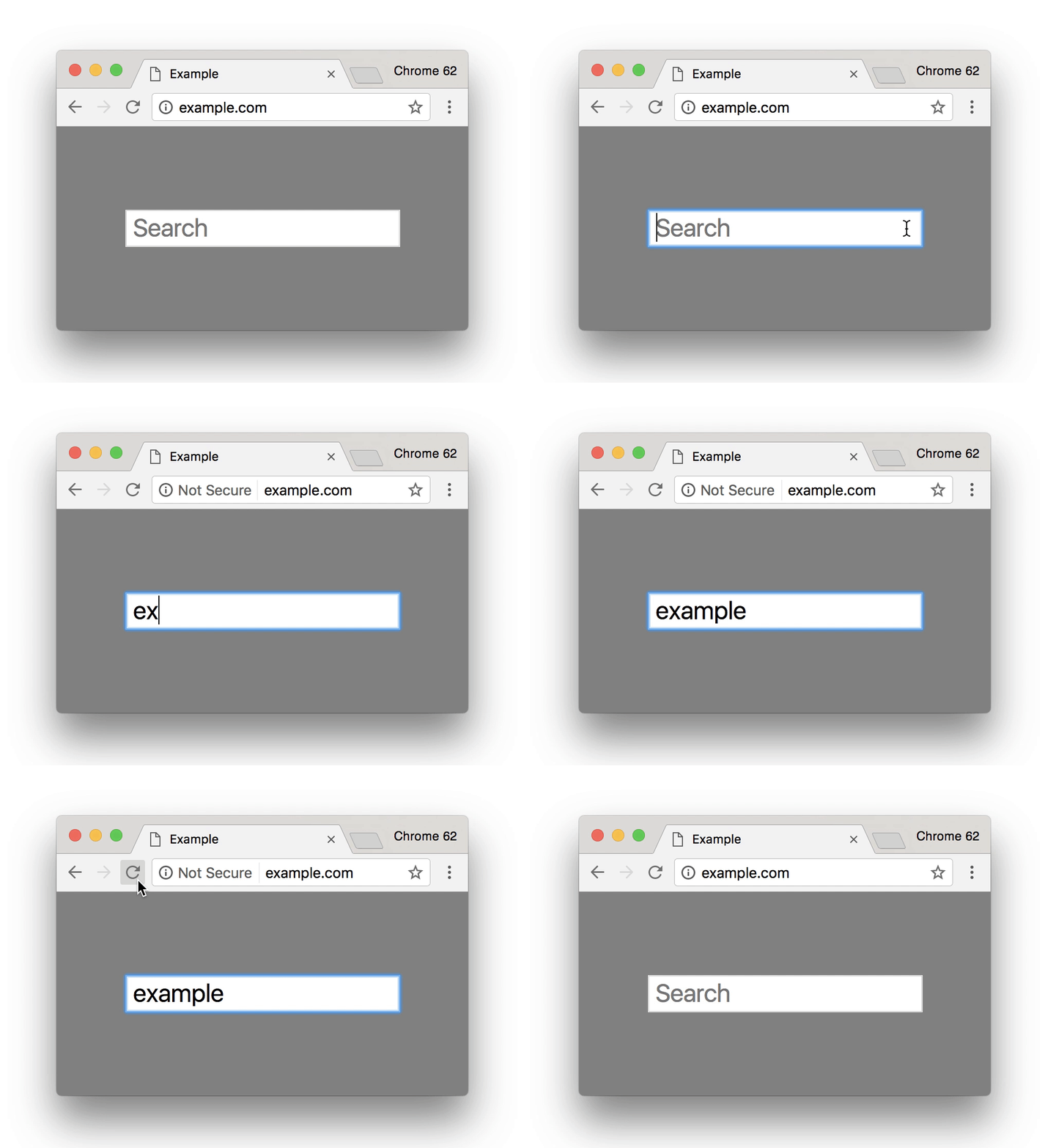
Starting in October 2017, Chrome version 62 plans to show the “Not secure” warning for all HTTP pages, even when using Incognito mode. HTTP sites will continue to work; Chrome currently, has no plans to block them. What will change is that security indicator(s)/ warnings will be displayed to the web user if they hit a page Chrome deems as “not secure” under these new guidelines.
This is how Chrome will show the warning based on the type of browser and page.

This is how Chrome will show the warning as a user filling out a form.
Here is what you need to do to avoid these warning messages:
- Host with a dedicated IP address
- Buy a Certificate
- Activate the Certificate
- Install the Certificate
- Update your site to use HTTPS
- If you migrate your site from HTTP to HTTPS, Google treats this as a site move with a URL change. This can temporarily affect some of your traffic numbers. See the site move overview page to learn more.
- or contact us and we can help