The short answer: build better category pages, stop Google wasting its time on filter URLs, and give product pages something the manufacturer’s description does not have. Those three things account for most of the ranking difference between ecommerce sites of similar size.
The longer answer is worth reading, because the order matters and because the usual advice (write more blog posts, get more links) tends to be the least effective work available to a store owner.
This applies whatever you are running. If you are specifically on Magento, the platform has its own set of problems that need handling first, and we have covered those in a separate piece.
Category pages are the asset, and most stores underbuild them
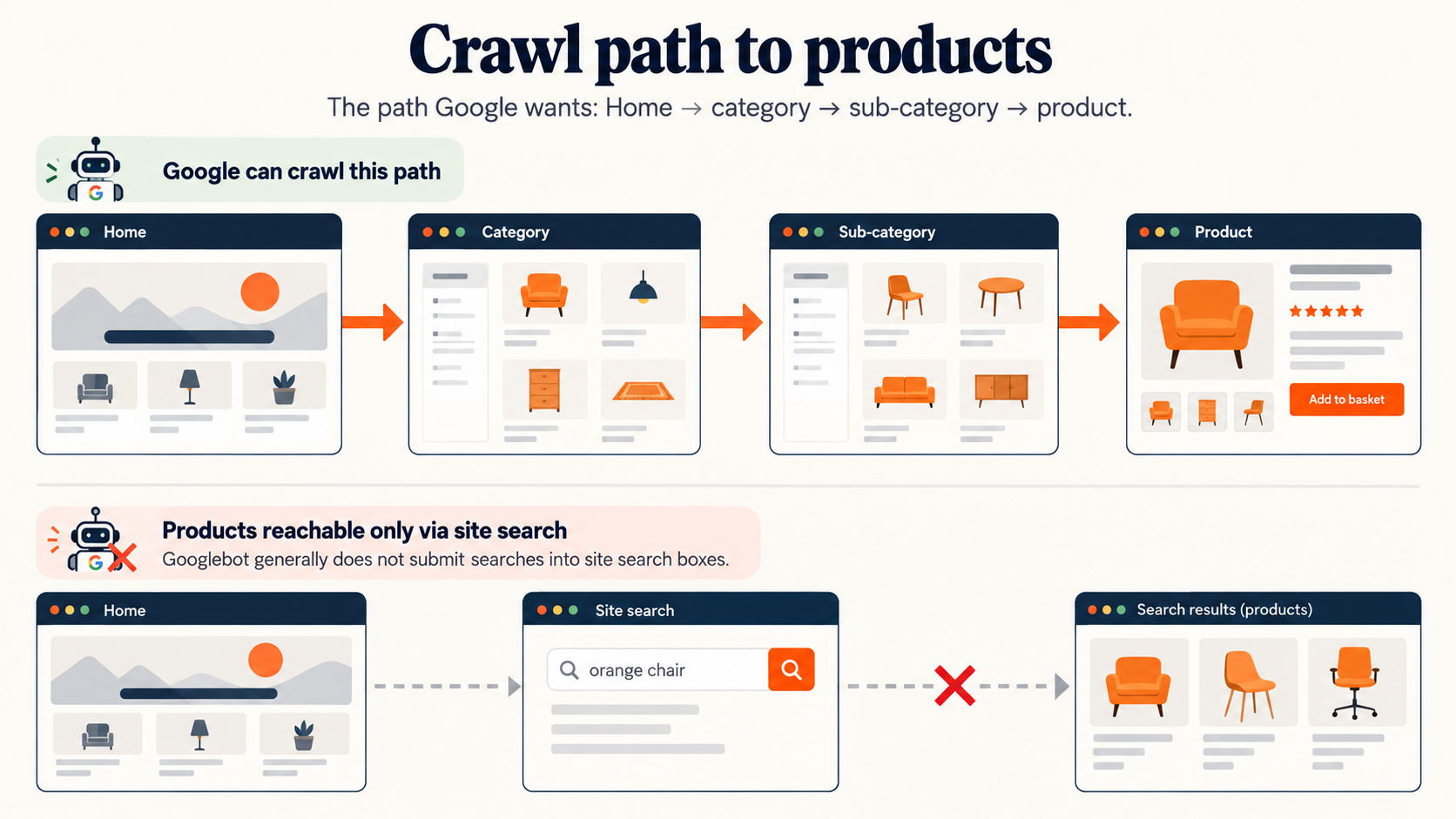
People search for product types far more often than they search for specific products. “Stainless steel work benches” gets searched constantly; a particular SKU gets searched by people who already know what they want and mostly know where to buy it. That means your category pages carry the commercial demand, and on most sites they are a heading, a grid of thumbnails and a paginator.
Add the thing a good salesperson would say. What distinguishes the options in this category, what to consider before choosing, what the common mistake is. Three or four paragraphs, written by someone who knows the products. This is the single most reliable ranking improvement available to an ecommerce site and it is the one that gets deferred indefinitely because nobody wants to write it.
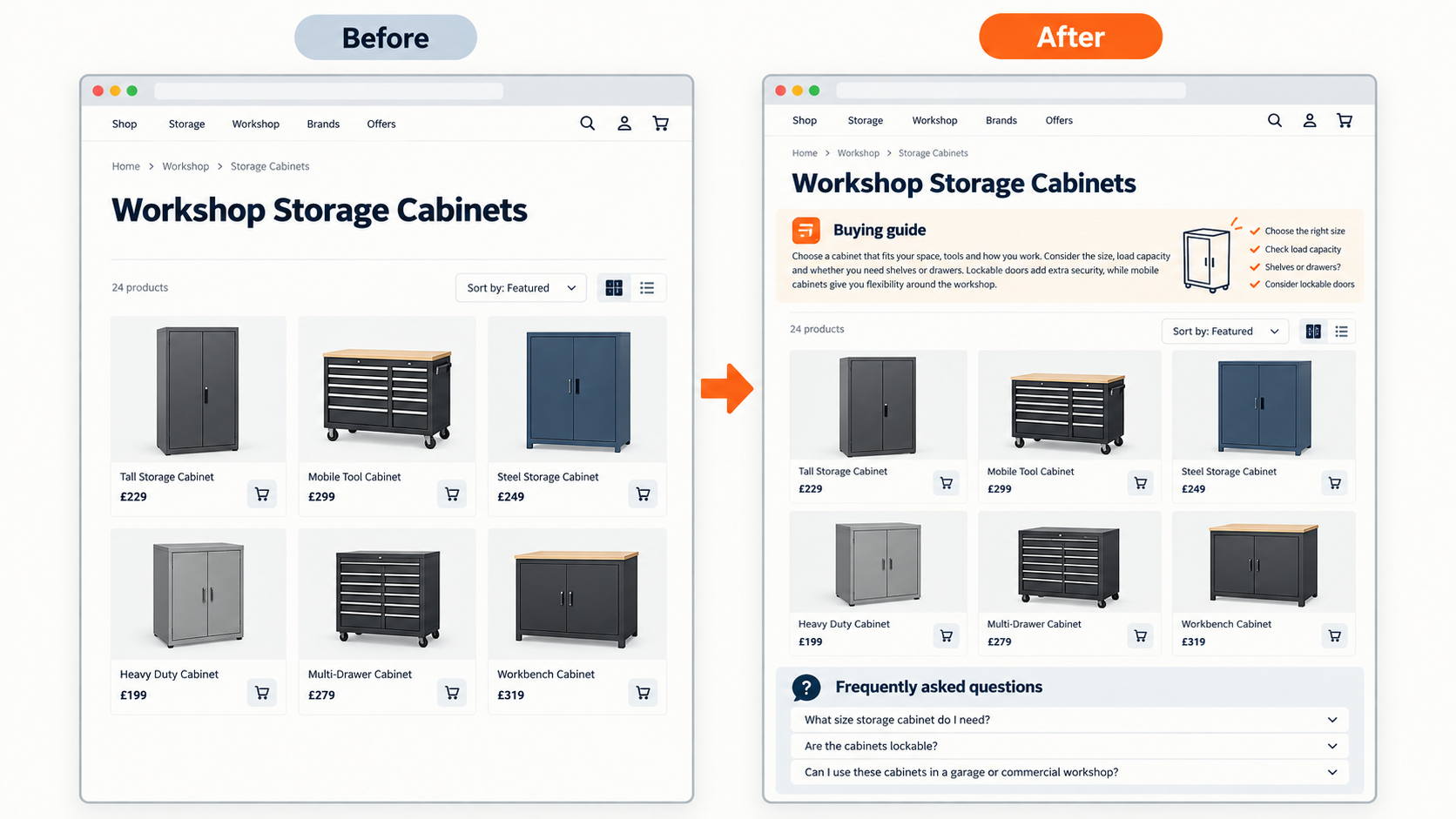
Category structure matters as much as category content. Google’s ecommerce guidance is specific about the shape it wants: “add links from menus to category pages, from category pages to sub-category pages, and finally from sub-category pages to all product pages”.
Two warnings from that same guidance are worth repeating. If products are only reachable through your on-site search, Google will not find them, because “Googlebot generally doesn’t try to submit searches into a search box as part of crawling a site.” And navigation built with JavaScript click handlers rather than real <a href> links may not be followed at all. Both are common on modern storefronts, and both are invisible until you check.
Product pages and the manufacturer description problem
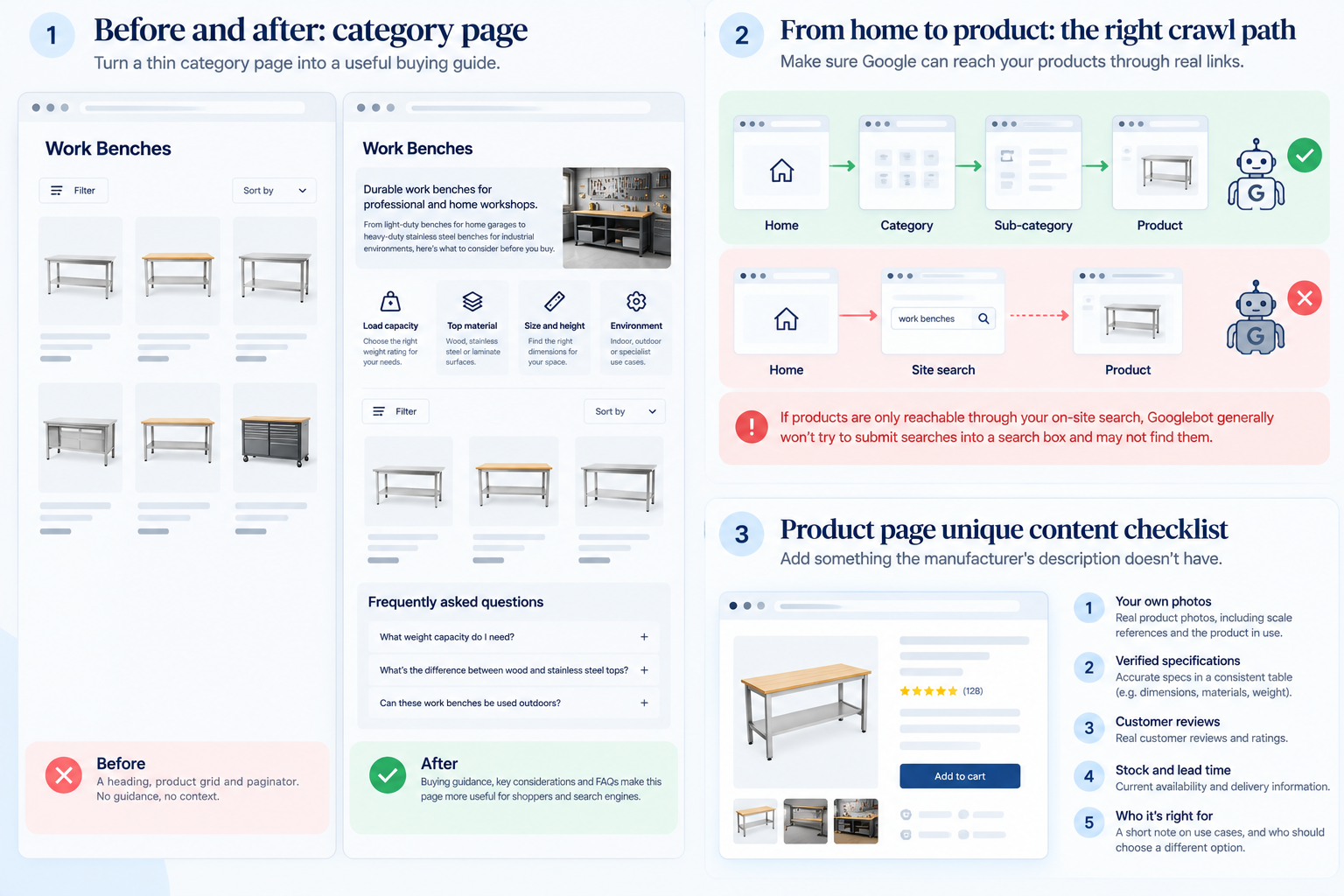
If you are a reseller, your product descriptions came from a supplier feed, and so did those of every other retailer carrying that line. You are competing with forty sites holding identical text, and Google has no reason to prefer yours.
You cannot rewrite four thousand descriptions. You can add something to each page that nobody else has:
- Your own photos, including scale references and the product in use
- Specifications you have verified, in a consistent table
- Real customer reviews, which are unique content and a conversion asset at once
- Genuine stock and lead time information
- A short note on who this is right for and who should buy the other one
Start with the two hundred products that carry the most search demand or the most margin, not the whole catalogue. The rest can wait, and some of them should never get the attention at all.
Internal linking is the other underused lever, and it is nearly free. Google’s guidance is blunt about the mechanism: “the more links a page has to it within a site, the higher the relative importance of the page to other pages on your site.” Most stores link everything to the homepage and almost nothing to the categories they actually want to rank. Related products, “often bought with” blocks and links from buying guides into the relevant category all move signals to where you want them.
Get your Product structured data right while you are in there. Price, currency and availability need to be accurate and current, because stale availability is the most common reason merchant rich results disappear.
Stop Google crawling things that will never rank
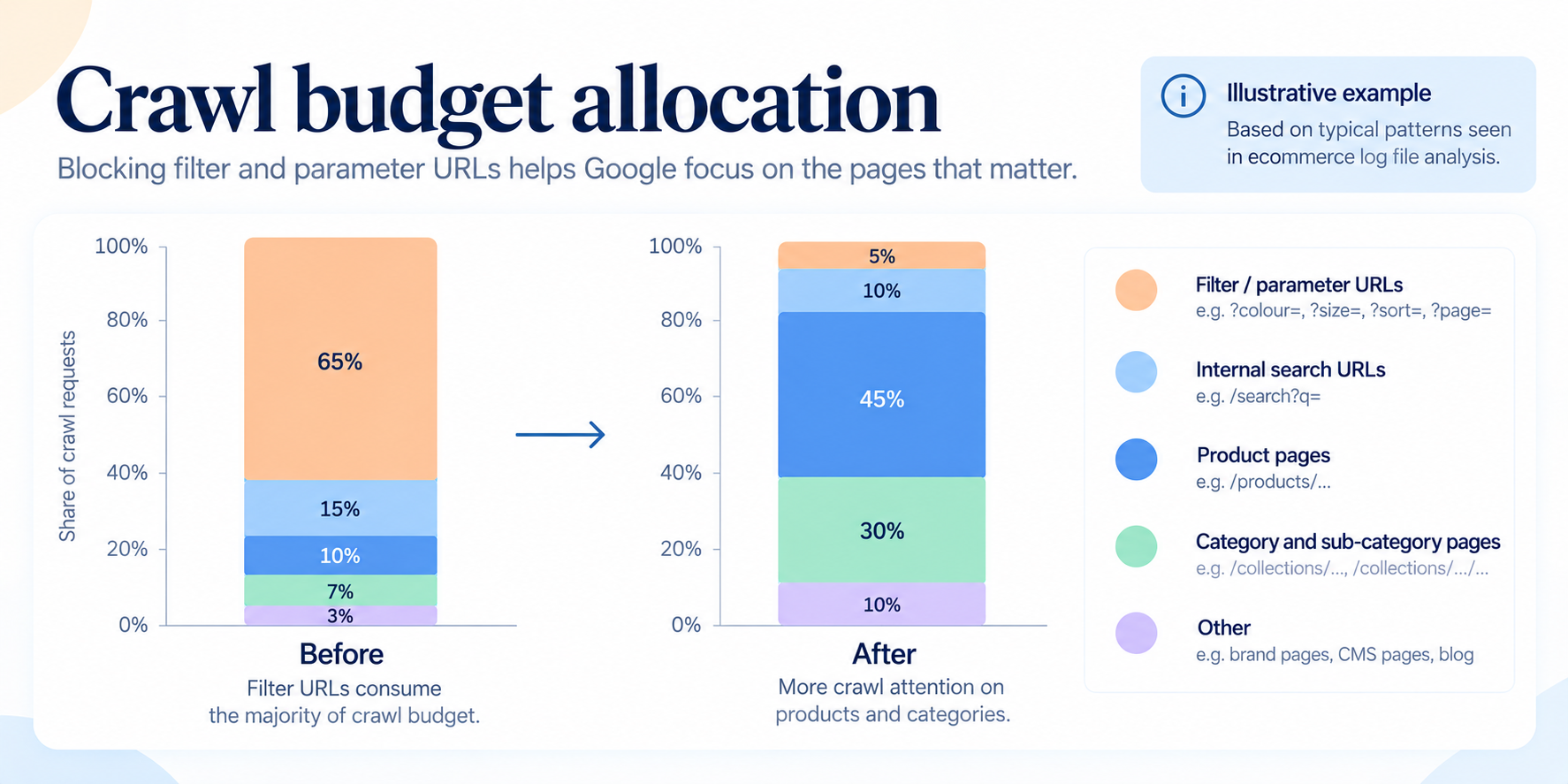
Every ecommerce platform generates filter URLs, sort URLs, pagination URLs and session parameters. Left alone, Google spends its crawling on those instead of on your new products and your updated categories.
Google’s position on this is unusually direct. Blocking crawl of faceted URLs in robots.txt is the recommended approach, because filtering “consumes server resources for no or negligible benefit.” URL fragments avoid the problem passively, since “Google Search generally doesn’t support URL fragments in crawling.” And rel="nofollow" and canonical tags, the two things most SEO plugins do, are described as “generally less effective in the long term”.
That is worth internalising, because a canonical tag does not save you any crawling. Google still has to fetch the page to read the tag.
The same guidance suggests returning a 404 for filter combinations with no products, rather than an empty results page, and using ampersands rather than commas or brackets as parameter separators so crawlers can parse them.
Alongside that, prune. Discontinued products, empty categories, old campaign landing pages and duplicate variant URLs accumulate on every store over time. Decide for each whether it should be redirected, kept and improved, or removed. Sites that do this well tend to have fewer indexed pages this year than last year and more traffic, which is a result that confuses people until you explain it.
What AI answers change for retailers
Plenty of vendors are selling AI search optimization as a separate service. Google’s own documentation undercuts that: to be cited in AI Overviews or AI Mode a page must be “indexed and eligible to be shown in Google Search with a snippet,” and “you don’t need to create new machine readable files, AI text files, or markup to appear in these features”.
What does shift is the type of query that sends you traffic. Google describes a “query fan-out” approach, running multiple related searches across subtopics to assemble an answer. Comparison and selection questions are exactly the kind of thing that gets fanned out, which favours pages that answer a narrow buying question cleanly: what size do I need, what is the difference between these two grades, what should I look for.
That points back at the same work. A category page with real buying guidance is more citable than a grid. Verified specifications in a consistent table are more usable than a paragraph of supplier prose. You are not optimizing for a new system, you are being clearer for the existing one.
On marketplaces, be realistic. For commodity products where Amazon carries the same SKU at a lower price, organic search is not a fight you win on the product term. The winnable ground is category and advice terms, product types where specification and support matter, and anything where you can offer something a marketplace cannot. Knowing which of your catalogue falls into which bucket is worth more than another round of on-page optimization.
The order to do this in
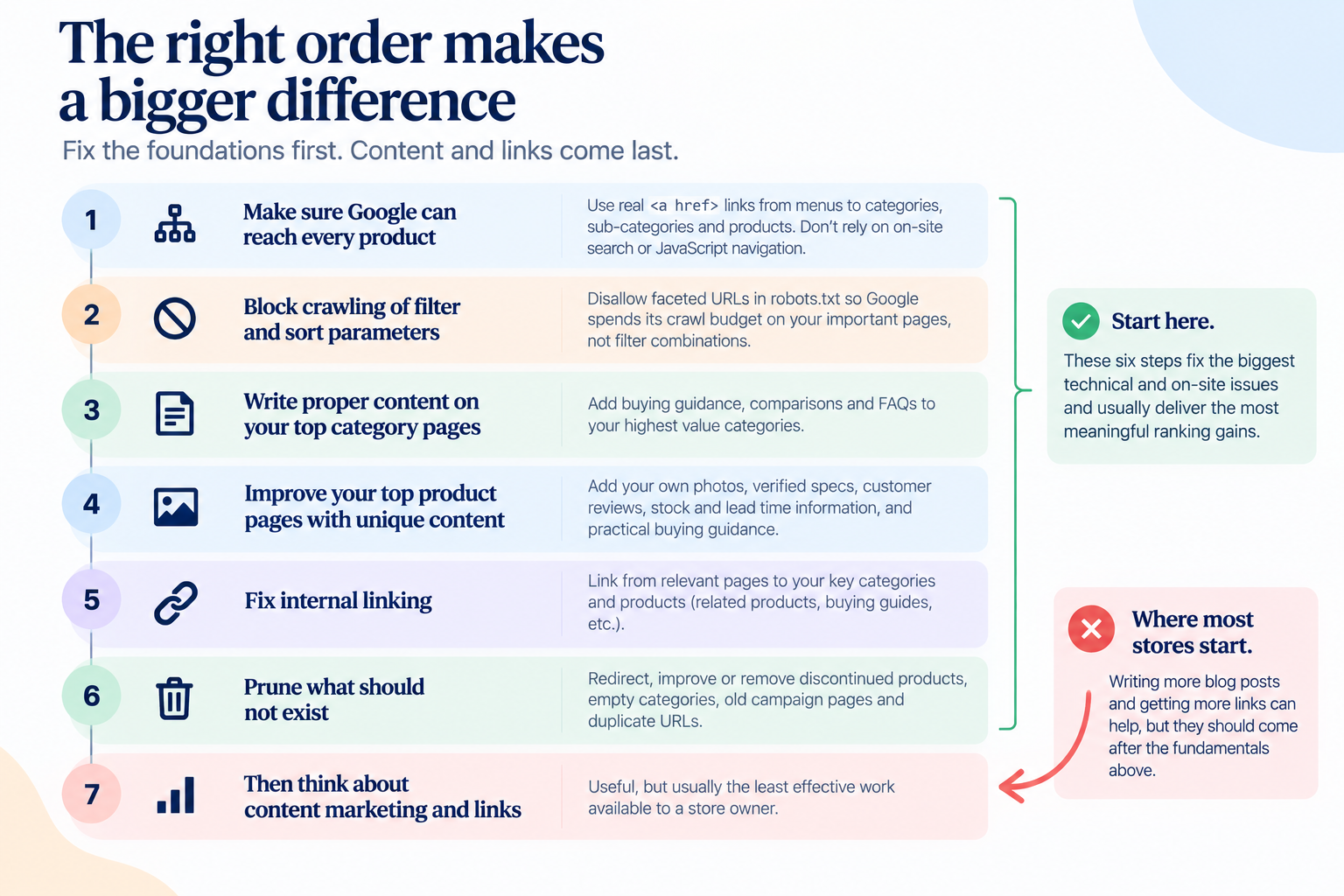
- Confirm Google can reach every product through real links, not just search or JavaScript.
- Block crawling of filter and sort parameters.
- Write proper content on your top twenty category pages.
- Improve the top two hundred product pages with your own photos, specs and reviews.
- Fix internal linking so category pages get the links they deserve.
- Prune what should not exist.
- Then think about content marketing and links.
Most stores do that list backwards, starting at seven.
On timing: crawl and indexing changes show in Search Console within a few weeks. Category content typically takes two to four months to translate into position changes, longer in competitive categories. Anyone quoting you results in thirty days is either lucky or selling something.
One honest caveat. If your prices are not competitive and your delivery is slow, better rankings will bring you more visitors who leave. SEO amplifies whatever your store already is. Fix the offer first if that is the real problem, and any agency worth hiring will tell you so before taking the retainer.
If you want a specific list for your store rather than a general one, we audit ecommerce sites across North America and will tell you which of these actually apply to you.