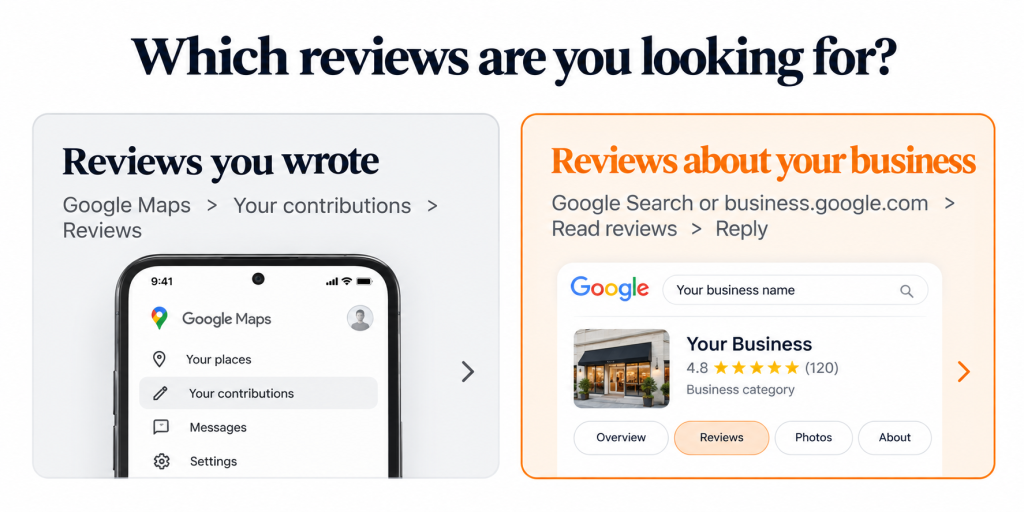
If you wrote the review, open Google Maps on a computer, click the menu in the top left corner, choose Your contributions and then the Reviews tab. On the phone app, tap your profile picture, then Your profile, then Reviews. Everything you’ve posted from that Google account is listed there, newest first, and the three dots beside each one let you edit or delete it.
A missing review usually means you’re signed in to a different Gmail account from the one you wrote it under. Less often, Google took it down for breaking its content policies, or the business listing itself was merged or removed.
If the reviews you’re after are the ones customers wrote about your business, they live on a different screen. They’re also doing a lot more work for you (or against you) than they were when this page first went up. The rest of this page is about those.
Finding the reviews customers left for your business
Sign in to the Google account that owns or manages your Business Profile first. Then:
- Search Google for your business name, or go to business.google.com.
- When your profile’s management panel appears, select Read reviews.
- Click Reply under any review, write your response and submit it.
Replies only work once the profile is verified. Google checks every reply against its content policies before it goes live, which its help centre says usually takes about ten minutes but can occasionally take up to 30 days. The reviewer is notified when you reply and can edit their review afterwards, so a reply that picks a fight can easily earn you a longer version of the original, with more adjectives. Your reply appears under the business name, not yours.
A missing review usually means you’re signed in to a different Gmail account from the one you wrote it under. Less often, Google took it down for breaking its content policies, or the business listing itself was merged or removed.
If the reviews you’re after are the ones customers wrote about your business, they live on a different screen. They’re also doing a lot more work for you (or against you) than they were when this page first went up. The rest of this page is about those.
Seeing your reviews takes about a minute. Keeping them recent, and replying to them without creating a compliance problem, is ongoing work. That’s what Canopy’s reputation management service handles for manufacturers, contractors, clinics and law firms.
Google reads your reviews before your customers do
Since October 2024, Google Maps in the US has shown a Gemini-written summary of a business’s reviews above the reviews themselves. BrightLocal’s 2026 Local Consumer Review Survey, published in February and based on 1,002 US adults, found that 82% of consumers read these AI summaries and 23% would rely on the summary alone. For about one in four people comparing you with a competitor, the paragraph Google writes is the review.
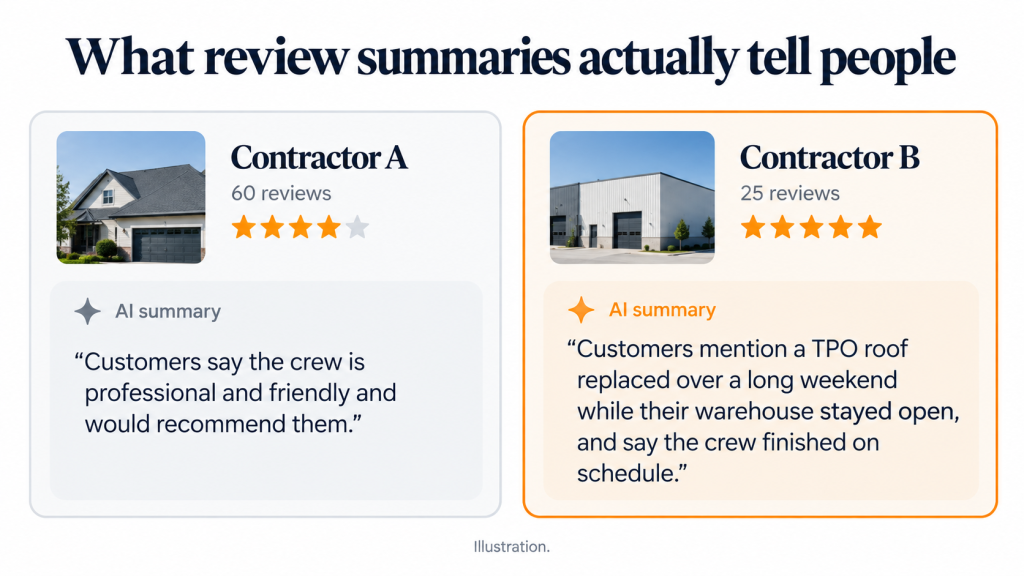
That paragraph can only be as specific as what your customers wrote. Picture a commercial roofing contractor with 60 five-star reviews, most of them some version of “great crew, highly recommend.” The summary Google builds from those will tell a reader the crew is professional, which is true of every roofer in town. Now picture a competitor with 25 reviews that mention a TPO membrane replaced over a long weekend and a warehouse that stayed open the whole time. A facilities manager reading both summaries learns nothing about the first company. The second answers half her questions. (Both contractors are invented for this example.)
Recency counts for more than most owners assume. In the same survey, 74% of consumers said they look for reviews from the last three months, and 31% said they’d only use a business rated 4.5 stars or higher, up from 17% a year earlier. A 4.8 built on reviews from 2023 reads, to that customer, like a business that stopped getting work.
Reply to every review, unless you run a clinic or a law firm
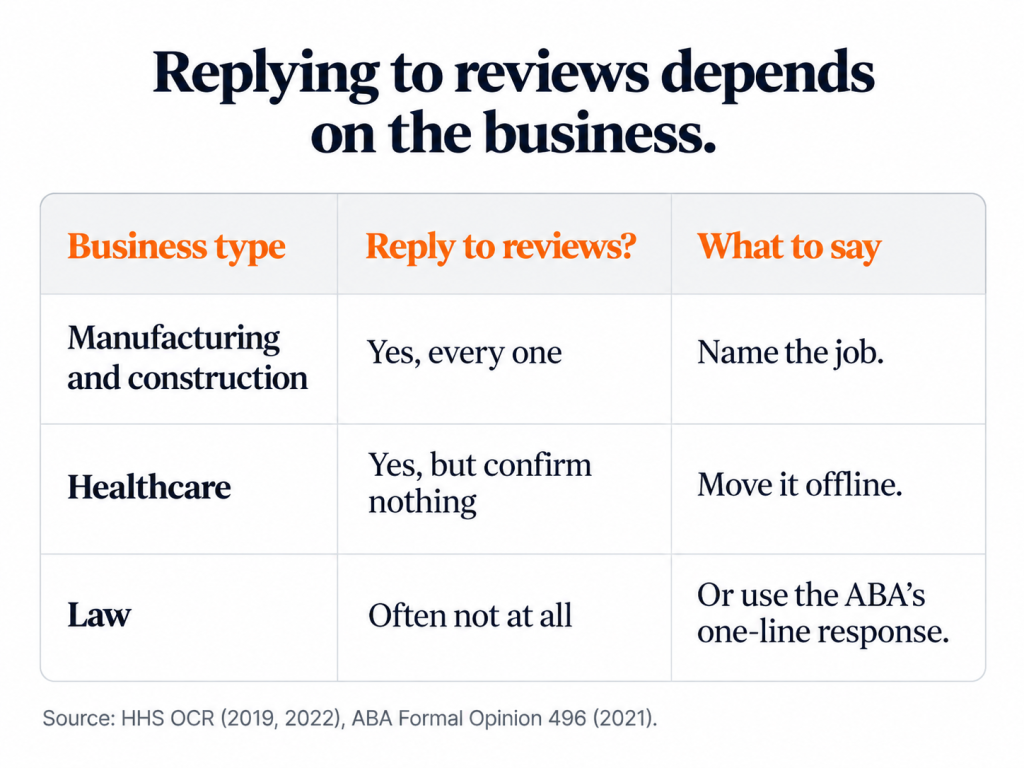
Customers expect an answer. BrightLocal found 89% expect owners to respond to reviews, and half are put off by replies that read like templates. For a manufacturer or a contractor, reply to everything within a few days and say something particular. “Glad the retrofit on Line 3 came in under the shutdown window, Dave” tells the next reader (and Google’s summary) more than “Thanks for your kind words!” ever will.
Healthcare and legal are different, and this is where generic review advice gets people into trouble. In a medical or dental office, confirming that someone is a patient is already a disclosure. Elite Dental Associates in Dallas paid the US Department of Health and Human Services $10,000 in 2019, and New Vision Dental in California paid $23,000 in December 2022, both over replies to online reviews that revealed patient information. Ontario practices have PHIPA to answer to as well.
Lawyers hit the same wall from another side. The American Bar Association’s Formal Opinion 496, issued in January 2021, says a negative online review doesn’t give a lawyer licence to reveal client information in response, and it generally advises against replying to a client’s review at all. Ontario lawyers carry the same confidentiality duty under the Law Society’s Rules of Professional Conduct.
If you run a clinic or a firm, a reply that wins the argument is a reply you’ll pay for eventually, and the right amount of detail in a public response to a patient or client is none. This is the whole reply we’d give a dental practice facing a one-star review: “We take every concern seriously, and privacy rules mean we can’t discuss anyone’s care here. Please call our office manager at [number] and we’ll talk it through.” It names nobody and confirms nothing. Everyone who reads it later sees a calm business. Law firms can go drier still; the ABA’s own suggested line is “Professional obligations do not allow me to respond as I would wish.”
Asking for reviews without breaking the rules
Google’s review policy bans “discouraging or prohibiting negative reviews, or selectively soliciting positive reviews from customers,” wording it added in 2022. That rules out the tools that ask customers to rate you privately first and only send the happy ones on to Google. For US businesses, the FTC’s rule on consumer reviews and testimonials, in force since October 21, 2024, goes further. It bans fake and purchased reviews, undisclosed reviews from staff and the suppression of negative feedback, with civil penalties of up to $53,088 per violation. On December 22, 2025, the FTC sent its first warning letters under the rule to ten companies. Selective gatekeeping was one of the practices it flagged.
What works is boring. Ask every customer at the same point (when the job is signed off, say, or the file closes) with the same direct link to your review form, and keep treatment or case details out of the request. You’ll get some three-star reviews. They’re what make the five-star ones believable.
Where Canopy Media comes in
Canopy Media works with manufacturers, healthcare practices, law firms and construction companies from offices in Canada and the USA. Reviews are part of the local search work we do for them. We build a request process that holds up under Google’s rules and the FTC’s, and we write reply guidelines your front desk can follow without phoning a lawyer every time. Then we track whether the extra reviews turn into calls and enquiries, because a better star rating that doesn’t change the phone log hasn’t done its job.
We won’t promise to remove a legitimate negative review. Nobody can. Google doesn’t take honest reviews down on request, and an agency that claims otherwise is either guessing or planning something the FTC would like to hear about.
If you want to know what Google is telling people about you, book a free consultation. We’ll read your last year of reviews with you, along with the summary Google shows for your business and for the two competitors you lose the most work to.